> For the complete documentation index, see [llms.txt](https://guide.taskforgeapp.com/llms.txt). Markdown versions of documentation pages are available by appending `.md` to page URLs; this page is available as [Markdown](https://guide.taskforgeapp.com/sync-tasks-from-canvas.md).

# Sync Tasks from Canvas

Follow directions on your phone:

Navigate to your Canvas home page&#x20;

Click on the Hamburger menu icon

<div align="left"><figure><img src="https://2754362143-files.gitbook.io/~/files/v0/b/gitbook-x-prod.appspot.com/o/spaces%2Fb06w1V9C579bHmJdmsuy%2Fuploads%2FgvHr1a7g5sGRII7azBi4%2F3D13AA17-3732-4926-A956-7090904DBB52_1_201_a.jpeg?alt=media&amp;token=cb56ef59-b852-4b8d-84ee-4ce594708f99" alt="" width="188"><figcaption></figcaption></figure></div>

Click the *Calendar* tab

<div align="left"><figure><img src="https://2754362143-files.gitbook.io/~/files/v0/b/gitbook-x-prod.appspot.com/o/spaces%2Fb06w1V9C579bHmJdmsuy%2Fuploads%2FQk9eRLyCMhLieVBiVeeY%2F0FA8EAA6-DB69-4315-9A3E-E2C632C9DE0F_1_201_a.jpeg?alt=media&amp;token=fb4cf832-1c01-4687-b5af-1d074da6cca0" alt="" width="188"><figcaption></figcaption></figure></div>

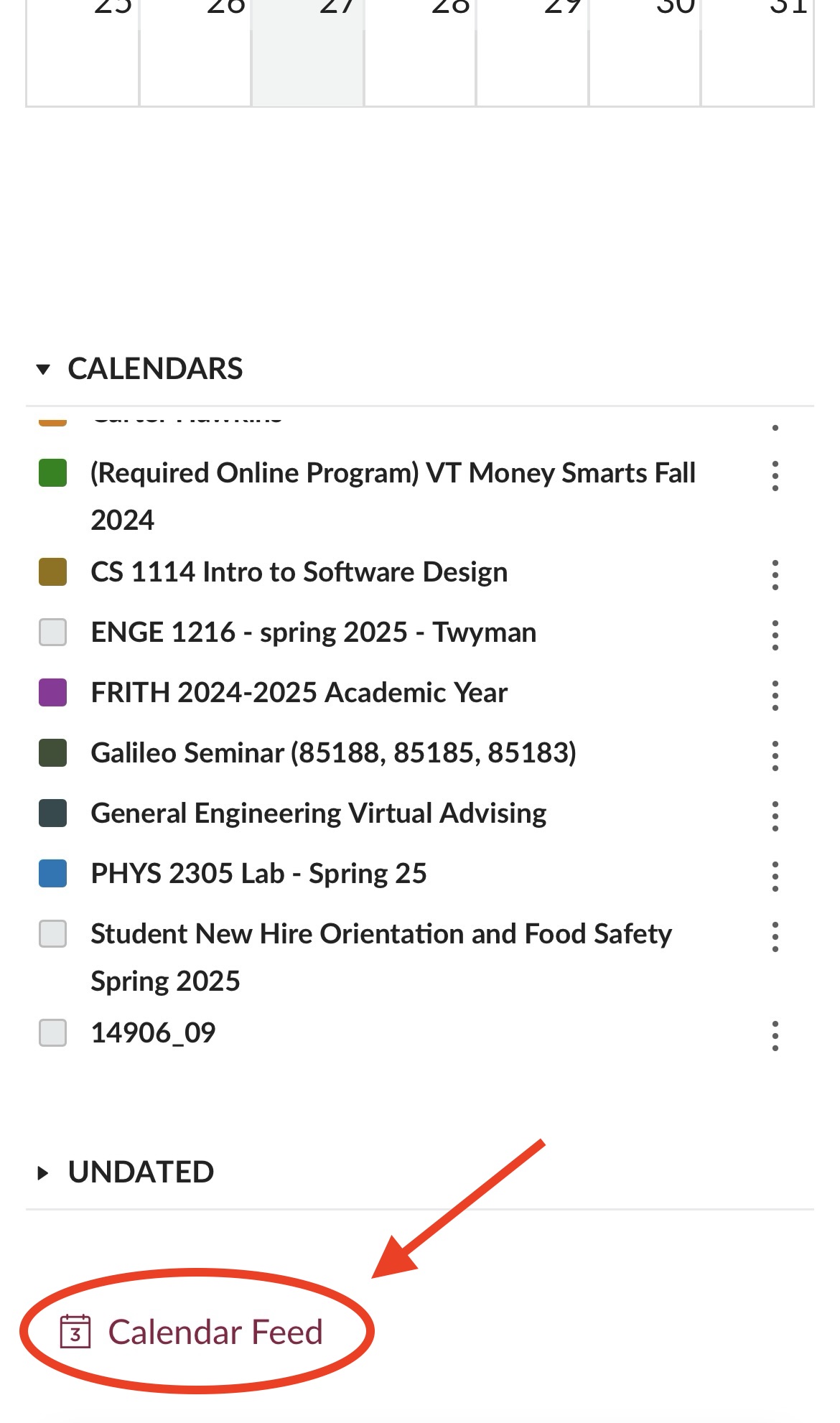
Scroll down and click *Calendar Feed*

<div align="left"><figure><img src="https://2754362143-files.gitbook.io/~/files/v0/b/gitbook-x-prod.appspot.com/o/spaces%2Fb06w1V9C579bHmJdmsuy%2Fuploads%2FidToMzZEAvFVvqzydMIg%2FF067901D-E97B-4CB6-8024-4D0F01E599D9_1_201_a.jpeg?alt=media&amp;token=f9bacbcf-c76d-424a-9426-1aa1e398ef75" alt="" width="188"><figcaption></figcaption></figure></div>

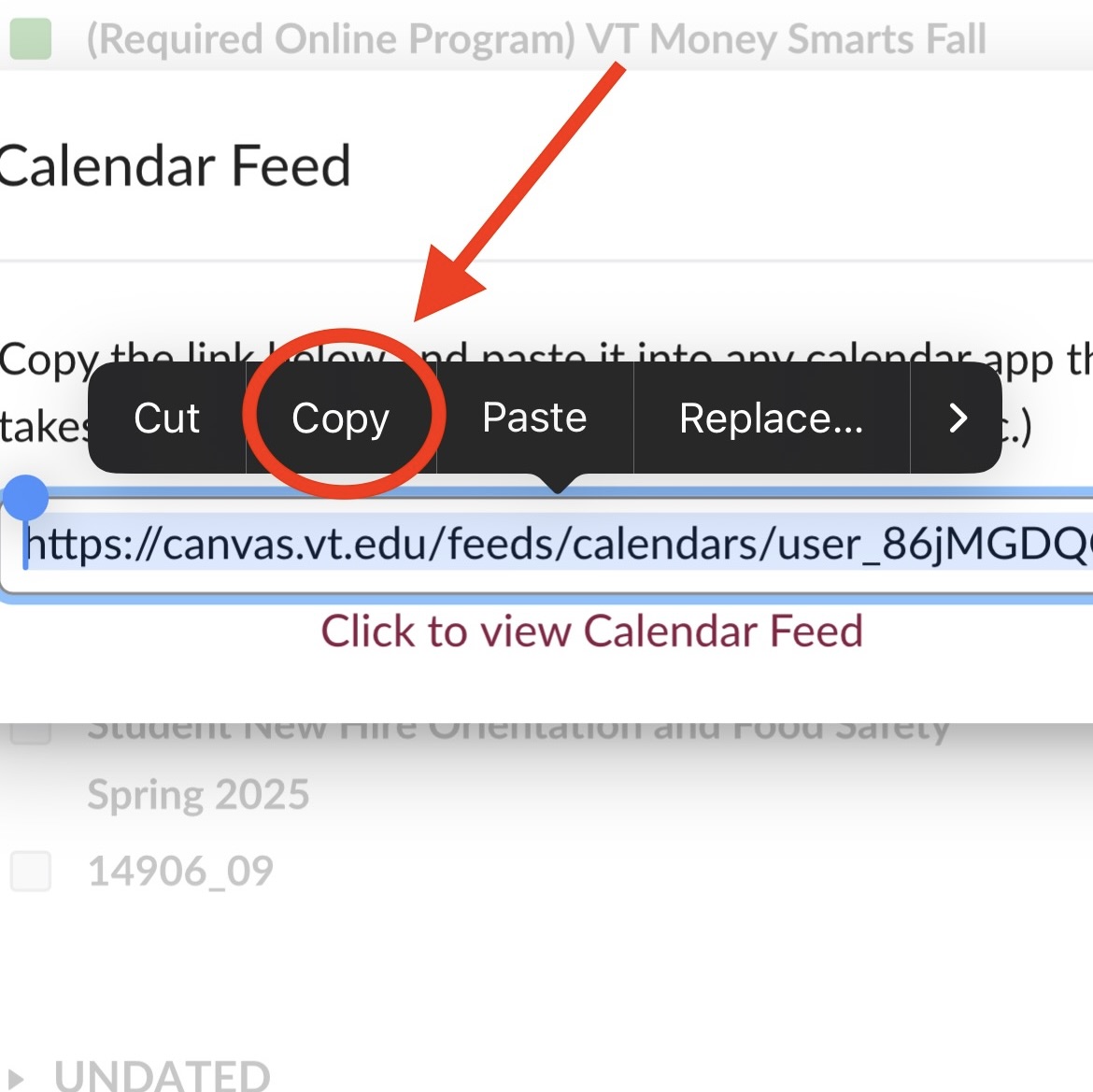
Copy the URL Link

\*Make sure to select the entire URL!!

<div align="left"><figure><img src="https://2754362143-files.gitbook.io/~/files/v0/b/gitbook-x-prod.appspot.com/o/spaces%2Fb06w1V9C579bHmJdmsuy%2Fuploads%2F3oYrztb2F3oL1HbEd4TV%2F2034D1E4-EBBA-4ED8-BEBA-B99633D03C52_1_201_a.jpeg?alt=media&amp;token=c471a14e-7f27-4961-a22e-a22bb0d3b9fc" alt="" width="375"><figcaption></figcaption></figure></div>

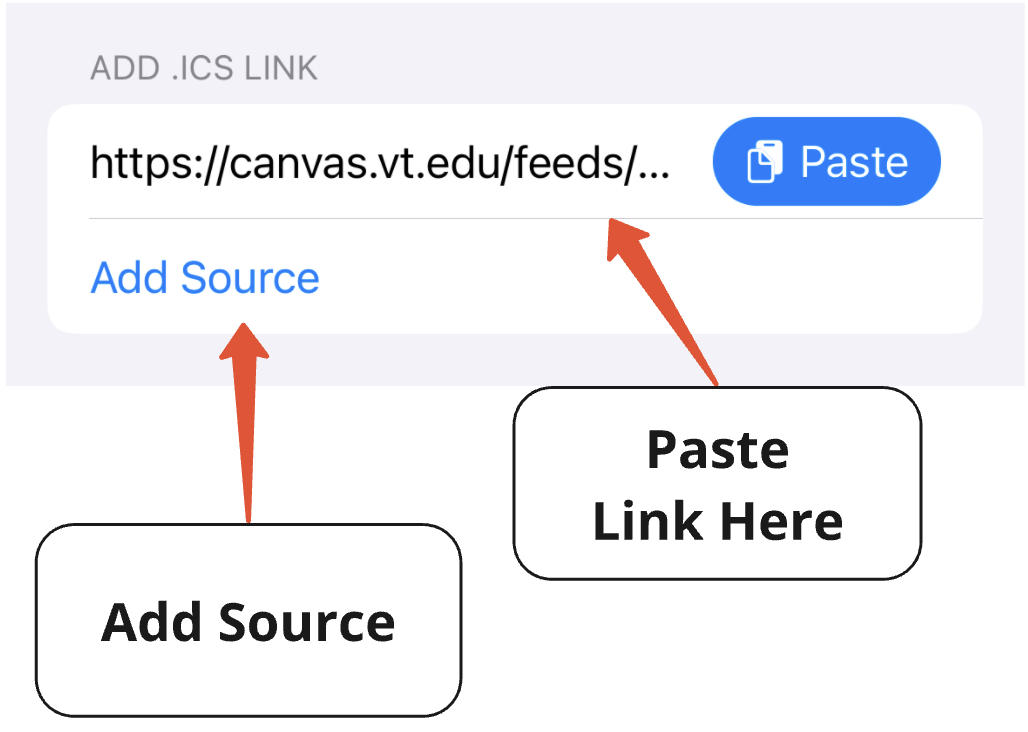
In the More tab, navigate to the *Syncing* section and select *Add Canvas or Calendar Connection.* Paste the link into the *Add .ICS Link* field.

<div align="left"><figure><img src="https://2754362143-files.gitbook.io/~/files/v0/b/gitbook-x-prod.appspot.com/o/spaces%2Fb06w1V9C579bHmJdmsuy%2Fuploads%2FLPLzqY1IWJolo4SYFFnC%2FScreenshot%202024-12-30%20at%2010.48.01%E2%80%AFPM.png?alt=media&amp;token=e4505733-864c-4839-835e-2430d14bf74c" alt="" width="375"><figcaption></figcaption></figure></div>